User-facing changes to Aethor. Internal refactors, migrations and dependency updates are intentionally omitted.
1.4.10 — Background task fixes
Latest
October 2026
More reliable suggestion timers and fewer background Discord requests.
Fixes
Suggestion voting timers now leave removed servers alone during the data-retention period and resume if Aethor rejoins.
Server-data cleanup now runs daily with randomized timing and paced Discord requests. Aethor still confirms removal before deleting data after the seven-day waiting period.
1.4.9 — Setup guidance and reliability improvements
October 2026
Get clearer setup guidance, recover from permission problems, and keep suggestions running reliably.
Setup
Setup and permission messages now include clearer next steps, links to the setup guide, and a way to recheck channel permissions. The dashboard helps new servers create their first suggestion setup.
Server invites include the permissions needed for setup, and Discord commands respond more reliably when requests are slow.
Privacy
Stored server data is scheduled for deletion seven days after Aethor confirms its removal. Adding Aethor back before cleanup preserves the data; personal tags and account preferences are kept.
Fixes
Improved automatic suggestion decisions, background tasks, and error reporting.
1.4.8 — Report problems from Discord and the dashboard
October 2026
Send feedback with /feedback in Discord or report a problem without leaving the dashboard.
Feedback
Use /feedback in a server to send feedback or report a problem with Aethor.
Privacy
Updated the privacy policy to explain data collected through the bot, dashboard, website
1.4.7 — Smarter auto-publish
October 2026
Auto-publish checks what Discord allows before publishing, and the dashboard shows when it cannot.
Auto-publish
Replies, forwards, system messages and messages that were already published are skipped instead of failing.
Aethor checks it can view the channel and has Send Messages and Manage Messages before publishing, including while it is timed out.
Bot health on the dashboard now lists each auto-publish channel and flags missing permissions or channels that are not announcement channels.
1.4.6 — Suggestion channel fixes
October 2026
Messages in a removed suggestion channel are left alone instead of failing.
Suggestions
Fixed messages in a suggestion channel whose setup was just removed failing to post. The message now stays in place, and submitting through /suggest or the button explains that the channel is no longer set up.
1.4.4 — Custom submission forms and author voting
October 2026
Add your own fields to suggestion submissions, and optionally let authors vote on their own suggestions.
Suggestions
Add required and optional fields to the submission form, reorder them, choose how their headings look, and optionally ask for a discussion title. Set it up from the dashboard or Discord. Saved titles name automatic threads and threads started from the suggestion card.
With custom forms off, the submission modal keeps its usual fields. Each saved suggestion keeps the fields and formatting it was submitted with.
New Allow authors to vote setting, off by default. Author votes count toward automatic decisions. Turning it off keeps votes already cast.
Dashboard
Fixed setup saves that could fail or report a conflict after editing. Unsaved setup changes are now protected when you navigate away, and time limits keep their presets and custom units.
1.4.2 — Suggestion setup fixes
September 2026
More reliable setup creation and submission buttons, with clearer timer inputs.
Fixes
Fixed opening the dashboard from the setup wizard.
Slow Discord responses no longer time out setup creation or submission-button publication. Failed attempts clean up their messages, and replacing a button keeps the old one until the new one is saved.
Dashboard timers now offer unit selectors, clearer validation, and consistent ordering. Toggle settings show their labels and values on one line.
1.4.0 — Automatic suggestion decisions, voting windows, and command diagnostics
September 2026
Automate suggestion outcomes, control how long voting stays open, and troubleshoot command access privately.
Suggestions
Set independent positive and negative vote thresholds, choose the resulting status, and optionally wait through a quiet period before an outcome is applied automatically. Conflicting outcomes remain open for staff review.
Choose a voting window for each suggestion setup: Unlimited by default, a custom duration, or a timed preset from 1 hour through 1 year. Configure it in the dashboard or with /setup create and /setup modify; expired suggestions keep their discussion and staff-review controls.
Command diagnostics
Use /debug command:name for a private report covering command registration, permissions, setup, feature health, and suggestion submission protection.
1.3.3 — Dashboard updates, Spanish localization, and suggestion media fixes
August 2026
Keep the dashboard in sync with Discord, recover cleanly from short connection drops, and preserve media submitted for review.
Dashboard
Suggestion and review pages now update after changes made in Discord, without requiring a manual reload.
Suggestions
Images and videos are saved when a suggestion enters review, so approval no longer depends on the original temporary upload.
Spanish localization
Aethor now includes Spanish (Spain) translations for bot commands and messages, including suggestions, permissions, setup, tickets, tags, and moderation.
1.3.2 — Suggestion, dashboard, and sign-in reliability fixes
August 2026
Keep older suggestions usable, make dashboard changes more resilient, and prevent Discord sign-in requests from hanging indefinitely.
Suggestions
Suggestion views keep working when old records share a public number or have no stored message channel: Aethor shows the available content, explains deleted messages, and includes a direct Discord link.
Dashboard
Auto-publish settings now make only announcement channels selectable, label channel types clearly, and explain permission, plan-limit, validation, and conflict failures.
Dashboard configuration changes now handle expired sessions and changing permissions more gracefully.
Sign-in reliability
Discord sign-in and command-sync flows are more resilient when authorization services are slow or temporarily unavailable.
1.3.1 — Suggestion fixes and rate-limit improvements
August 2026
Keep suggestion commands working with older duplicate data and get more room for short bursts of commands.
Suggestions and reliability
Suggestion commands choose one matching record when duplicate public numbers exist, so older duplicate data does not turn ordinary views and moderation actions into errors.
Command rate protection allows more room for normal bursts before showing a retry prompt, while still giving a clear wait time when protection applies.
1.3.0 — Discord permissions, submission panels, and dashboard updates
August 2026
Manage Aethor permissions from Discord, publish customizable suggestion panels, and use clearer dashboard workflows in British English.
Permissions in Discord
The new /permissions command opens a private panel for reviewing and editing permission rules by feature area, enforced by the same rules and safeguards as the dashboard.
Edit a group rule or a single action: use the Discord default, pick one or more roles, or reset back to inheritance. Changes apply immediately and are recorded in the audit log.
Concurrent edits are safe: if the rules change in the dashboard while the panel is open, the panel refreshes instead of overwriting.
Check any member's access to an action and see whether a role rule, the Discord default, or a missing permission decided the result.
Sync Discord command visibility straight from the panel. If sync isn't enabled yet, a private one-time link completes the browser authorization, the tab closes itself, and the panel updates in Discord when the sync finishes.
Suggestion submission panels
Design a persistent suggestion submission panel from Settings → Suggestion settings with plain text or a rich embed, a destination channel, and a live Discord preview.
Customize the embed's author, title, description, links, images, fields, footer and timestamp, then choose the button label, style and emoji.
Publish one tracked panel per suggestion setup in a supported Discord channel. Editing a panel publishes the replacement before removing the previous tracked message.
The `/setup submit-button` command reuses the saved dashboard design, or publishes a locale-aware default when the setup has no saved design. Submissions use the setup's normal review queue, limits and media handling.
Dashboard
Dashboard pages have clearer descriptions, autoresponder matching modes explain when they reply, and review queue details are easier to scan.
Suggestion lists use a clearer View action and a more compact CSV export, auto-publish settings show channel names, and sign-in and sign-out copy is easier to understand.
Deleting a tag or autoresponder asks for confirmation and explains what will happen.
Language and reliability
British English now inherits missing text from the main English catalog and uses British spelling in suggestion and ticket settings.
Suggestion setup reports Discord failures accurately, and setup can finish without pinning the guide when Aethor does not have Pin Messages.
Website and documentation
The wiki includes task-focused guides for the Discord permissions panel and suggestion submission panels, with updated dashboard screenshots and navigation.
Browser back and forward navigation works reliably across the site.
1.2.1 — Hashtag emoji support
August 2026
Use the hashtag keycap in suggestion controls from either Aethor's emoji set or the Unicode picker.
Suggestions
Added the hashtag keycap to Aethor's built-in emojis and the curated Unicode emoji list in suggestion setup.
1.2.0 — Permissions, audit activity, and dashboard updates
August 2026
Set feature access by Discord role, review server changes, and manage more of Aethor from the dashboard.
Permissions and command visibility
Choose who can use each Aethor feature from Settings → Permissions. Set role-based rules for suggestions, tickets, tags, autoresponders, anti-invite protection, and more.
Use group rules for broad delegation or override one capability at a time. A selected-role rule can give a team access without granting it broad Discord permissions.
Review the action catalog, preview a batch of changes, and check what a role or current member can do before saving. Results show missing member or bot permissions, premium requirements, ownership, and other conditions.
The same permission decision now covers dashboard pages, slash commands, buttons, menus, and modal submissions. Server owners and Discord administrators still have a recovery path.
Read the generated capability reference in the documentation, or use the dashboard's Access view to inspect command paths and individual actions.
Optionally sync selected-role rules to Discord so its slash-command picker matches Aethor. The dashboard reports drift, failed updates, preserved channel and user entries, and commands that cannot be mirrored.
Anti-invite exemptions now use the shared permission system, so they follow the same access rules as other features.
Audit activity and bot health
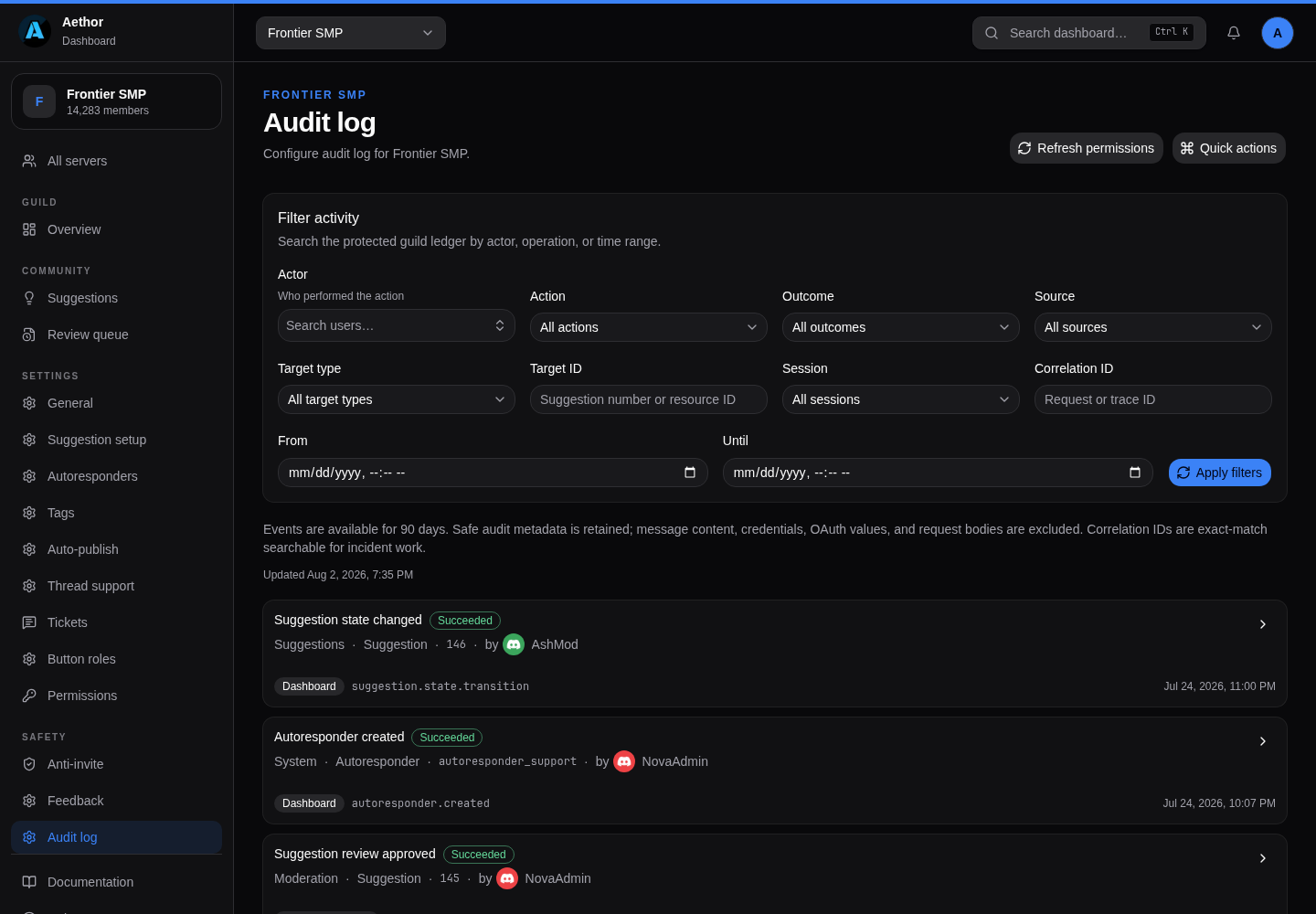
Review Aethor's server activity in a searchable dashboard audit log with actor, action, target, outcome, source, session, correlation ID, and time filters. Change details show safe before and after values with credentials and message content redacted.
Send selected audit events to one or more Discord staff channels with category, action, and outcome filters. Manage the same destinations from the dashboard or `/audit`.
Existing suggestion log channels migrate into the route system automatically, so current logging keeps working.
The suggestion setup page checks the Discord connection and configured suggestion, review, media, and audit destinations. It reports missing channels or permissions and distinguishes healthy, warning, error, and not configured states.
The guild overview shows bot-health errors, and `/status` adds guild-specific warnings and errors while keeping its global checks.
Aethor emojis and suggestion presentation
Aethor ships built-in application emojis for suggestion cards, moderation controls, notifications, setup panels, help, dashboard links, and the website. The bot syncs them to Discord and keeps Unicode fallbacks available.
Choose the source for each suggestion control: the default, an Aethor emoji, a curated Unicode emoji, or a server custom emoji.
Customize the upvote, net-vote separator, downvote, and start-thread controls.
Set a separate emoji for each suggestion activity log action, including submissions, edits, comments, state changes, duplicates, restores, review decisions, and blacklist changes.
The bot and documentation use the same emoji definitions and artwork in examples and live Discord messages.
Suggestions and notifications
Authors and followers receive private cards for published submissions, submissions waiting for review, converted messages, follows, status changes, comments, edit-review decisions, and review decisions. Cards include server context, previews, links, and relevant actions.
Follow or unfollow suggestions and turn suggestion DMs on or off from the notification card. `/suggestion-dms` now covers status, comment, and review updates.
Suggestion activity logs include the author, moderator, state changes, votes, reasons, comments, content diffs, origin, media context, and review IDs. Buttons open, manage, or restore the suggestion.
Set a staff-only suggestion log channel from setup. Blacklist additions and removals are logged with submissions, edits, reviews, comments, transitions, deletions, and restores.
Dashboard coverage
The suggestion setup editor has Channels, Appearance, and Rules & roles sections for state labels, colors, channels, review-queue settings, media storage, and submission controls.
Manage the suggestion blacklist from Settings → Suggestions, including adding members by recent activity or Discord ID and removing them later.
Open member profiles with suggestion counts, recent suggestions, feedback totals, blacklist status, and resolved Discord identities. Feedback from Aethor's feedback button is paginated.
Dashboard suggestion moderation supports duplicate actions, anonymous replies, public announcements, participant details, and live member resolution where needed.
Moderators can inspect upvoters, downvoters, and followers when their participant capability allows it. Unauthorized viewers see that identities are restricted instead of an empty list.
General settings load the languages available from the connected Aethor bot, so the server-language picker only offers valid choices.
Open Anti-invite protection directly with `/anti-invite`. Its channel and server exemptions use the shared permission model.
Use `/tags <tag>` to post a saved tag directly, optionally as an embed or with a member mention.
Paste server IDs or Discord invite links into the anti-invite allowlist. Violation logs show the target server and member count, with a button to allow a server directly.
The first-run suggestion setup checks the selected channel's actual permissions, including channel overrides, before creating the setup.
Website and documentation
Reorganized the wiki into task-focused sections and added guides for permissions, the capability reference, command visibility, troubleshooting, suggestion operations, dashboard workflows, and notifications, with redirects for existing links.
Search the site with the Search button or Ctrl/Cmd+K, follow an in-page table of contents, and copy any documentation page as Markdown.
Documentation pages now support callouts, link cards, generated capability tables, shared Discord and Aethor emoji examples, and machine-readable Markdown mirrors.
The site now generates page-specific social preview cards for public and documentation pages, with matching Open Graph and Twitter metadata.
The public site and dashboard have clearer responsive layouts, better asset loading, optimized Discord imagery, offline fallback behavior, and more reliable cache busting.
Reliability and security
Dashboard reads retry brief not-found and dependency errors while the bot or database is restarting, and stale requests are canceled when you change pages or setups.
Expired dashboard sessions return to the sign-in page with a clear message instead of leaving the dashboard in a broken state.
1.1.0 — The Aethor Dashboard
July 2026
Manage your server from the web instead of typing commands: suggestions, moderation, automations and safety tools.
The dashboard
Sign in with Discord and manage everything Aethor does from your browser at the new web dashboard. There's no bot token to paste and nothing extra to set up.
Get a private sign-in link straight from Discord with the /dashboard command.
Start from Your servers, which lists every server where you can manage Aethor, with Add new server to invite it somewhere new.
Only servers where you have the right Discord permissions show up, and every action is checked against your live roles before it runs.
Changes take effect in Discord immediately. There's no separate save step.
Overview and audit log
Each server opens on an overview with the headline numbers, the latest suggestions, and a live feed of recent moderation activity.
See an audit log of every change: what happened, who did it, and whether it went through.
Suggestions on the dashboard
Browse the whole suggestion board with state, author and age filters, and sort by newest or most-voted.
Open a single suggestion to see its vote breakdown, attachments, and the full history of state changes and staff notes.
Accept, deny, plan, implement, or mark a suggestion a duplicate from the action bar. Each change posts the same update to Discord that a slash command would.
Work the review queue from the web when submissions are gated behind staff approval.
Export the entire board to CSV from the suggestions page on premium servers.
Server tools on the dashboard
Configure suggestions from the setup manager instead of stepping through the in-Discord wizard.
Manage autoresponders and both guild and personal tags from the browser.
Set up tickets, build button-role menus, and configure thread support without leaving the page.
Manage anti-invite protection and auto-publish channels alongside the rest of your automations.
Documentation
Added Dashboard and Suggestions-on-the-dashboard guides, plus dashboard screenshots throughout the wiki.
1.0.1 — Fixes and refinements
July 2026
Smaller improvements to the bot's in-Discord flows ahead of the dashboard release.
Improvements
Multi-step staff and setup actions now happen in a single modal instead of a chain of separate prompts, including staff comments, the color and label editor, and adding ticket topics.
Suggestions keep working when Aethor is missing optional thread permissions, instead of failing outright.
Fixes
Fixed handling of personal tags and a few suggestion configuration updates.
1.0.0 — Suggestion workflows and moderation
July 2026
Suggestion workflows, moderation controls, documentation and site clarity.
Suggestions
Submit suggestions from a slash-command modal or a persistent submit button, in addition to typing in a suggestion channel.
Convert an existing Discord message into a suggestion from the message's Apps menu, without asking the author to repost it.
Use a private staff manage panel to edit, comment on, resolve, duplicate, or restore suggestions.
Add an optional pre-publication review queue with approve, reject, similarity review, and author context.
Configure cooldowns, membership-age requirements, exact-duplicate checks, and per-member open-suggestion limits.
Browse suggestions with state, author, vote, age and text filters; sort and paginate the results.
Move suggestions through Planned, Implemented and Duplicate outcomes alongside Accepted and Denied, with configurable labels, colors, channels, and history.
Pick vote emojis from your server's actual custom emojis in a private menu instead of typing raw emoji codes.
Optionally send member edits to the staff review queue for approval before they change a published suggestion.
Follow a suggestion with /suggestion follow to get a direct message when it changes status or gets a new comment, and opt in to auto-following the ideas you upvote with /suggestion-autofollow.
Award the suggestion author a configured role automatically when their idea is accepted or implemented.
Moderation and automation
Block unwanted server invites with anti-invite protection, including excluded channels, roles and servers, logging, warnings, and optional timeouts.
Create keyword autoresponders with configurable trigger matching and channel restrictions.
Commands, languages and apps
Check recent changes from Discord with the /changelog command, which links to this page.
Set a per-user or per-server language with /language, including a server-wide default for public suggestion content; all remaining bot copy is now fully translatable.
Use tags in DMs and as a user-installed app, alongside broader support for Discord's user-installed apps.
Send feedback from the Give feedback button, including which language you'd like Aethor to support next.
Setup and reliability
Use the guided setup wizard and the expanded suggestion dashboard.
Pick ticket-panel button colors from a menu instead of a hidden text code, and set per-state suggestion embed colors.
Set a net-vote threshold that turns a suggestion's color to the trending highlight once it becomes popular.
Re-host suggestion image and video attachments in a configured media channel.
Receive optional direct-message notifications when a suggestion changes state.
New setups include a pinned guide and example suggestion, while inactive channels can receive a limited reminder.
Fixes
Suggestion CSV export no longer corrupts rows when content has line breaks, and now opens correctly in Excel.
Fixed several commands silently failing to respond instead of showing an error.
Website and documentation
Rewrote the homepage around the complete suggestion workflow and added an immediate product preview.
Added feature, moderation, voting, threads, comparison, and anonymous-behavior landing pages.
Added task-focused wiki guides for creating a suggestion channel, enabling threads, approving suggestions, and configuring the review queue.
Expanded metadata, structured data, sitemap coverage, and concrete product descriptions for search and sharing.
Need the setup details?
The wiki is updated alongside product changes and includes current permissions, limits and known catches.